
by Elizabeth Engler on May 14, 2026, 10:30:01 AM
When designing an automated system that will interface with human operators, it is wise to develop the system as if it will be used by kindergarteners with gorilla-like strength.
Have you ever shown up to troubleshoot a machine only to discover IO wires ripped out, a cable yanked loose, a sensor knocked sideways, or an entire sensor bracket torn off its mount? Or walked up to an HMI or tablet that’s unresponsive, covered in dents, scratches, and a spider-webbed screen?
These scenes are all too common. And even if you haven’t seen the extreme cases, you’ve probably dealt with the everyday issues, accidentally bumped sensors, confused operators, dropped tools, “helpful” actions that made things worse, and maintenance steps that somehow never get done.
In Part 1, we’ll cover protecting the equipment, safety guarding, and smart product selection. Read on for Part 2, where we’ll discuss designing the user experience and lean process flow.
Using the Hierarchy of Controls in Industrial Design
We keep the Hierarchy of Controls front and center as part of our approach to industrial automation system design. This not only makes systems safer, but also leaner, more budget-friendly, easier to use, and simpler to maintain. It’s not just about protecting operators from equipment but protecting the equipment from the operators.
.jpg)
Image by NIOSH
Simplifying Systems to Reduce Failure Points
First, strip out anything unnecessary and try to accomplish the process and tasks with the bare minimum automated equipment and tools. Reduce clutter and remove objects from the space which are not part of regular operation.
The same principle applies for screen design. Only show operators the controls they need for their current step and hide or password-protect the rest.
Replace complicated setups with simplified, combined, or more automated solutions that require the least operator intervention possible, an approach that’s central to effective controls integration services.
Protecting Equipment from Operator Interaction
When at all possible, mount sensors and sensitive devices out of reach from operators and surround them with physical guarding to prevent bumps. Route cables and connectors out of the way or out of sight so they don’t get snagged or yanked.
To nearly eliminate network cabling headaches, consider wireless Ethernet or LoRaWAN setups. Cut down on IO wiring with IO-Link, Ethernet, AS-i, or other remote IO options.
Enclose electrical components and PLCs in panels with locked doors, especially when designing PLC and SCADA systems for real-world industrial environments. Many controls components, even laser and photo eye sensors, now offer lockout protection, so set passwords on these, IO blocks, HMIs, and PLCs to guard against tampering and keep out bad actors.
Designing for Operator Usability and Error Reduction
Intuitive systems with easy steps reduce operator mistakes and frustration. Look for tools with ergonomic grips to improve usage.
Whenever possible, attach lanyards or tethers to handheld tablets, styluses, pens, clipboards, and other tools. Secure them to a wall, machine frame, or wrist to prevent drops or the item getting “lost.”
Devices need their own PPE too. Choosing rugged materials, high IP ratings, and vibration tolerance, plus cases, covers, and screen protectors, can go a long way to prevent costly repairs and downtime.
Safety Guarding and Risk Reduction Strategies
Designing tough, “dummy-proof” systems to withstand operator abuse goes hand in hand with strong safety protocols to make your systems “sue-proof.”
First, remove hazard possibility. Move materials within easy reach so ladders or stepstools aren’t needed. Route or raise conveyors to avoid forcing operators to climb narrow steps or ladders to traverse them. Store tools securely when not in use and limit access to trained personnel only when necessary.
Substitute safer designs for more hazardous equipment. Increase automation to limit operator intervention and keep people away from moving parts.
Where you cannot eliminate a hazard, moving part, or pinch point, install guarding that keeps out even the smallest hands and fingers.
At access points where operators or technicians must interact with the machine, use safety-rated interlocks such as:
- Door locks
- Alarms
- E-stop circuits
- Dead-man switches
- Light curtains
- Opto-touch sensors
- Cable-pull switches
- Laser scanners
- Pressure-sensitive floor mats
Maintenance, Housekeeping, and Workplace Safety
Good housekeeping will keep your systems running smoothly and safely. Keep walkways clear and dry, or use textured flooring to prevent slips.
Assign regular maintenance tasks like cleaning sensor lenses and screens, checking sensor alignment and function, inspecting cable connections, and maintaining seals on panels and enclosures to keep out dust and moisture.
Notify operators of potential hazards with clear, vibrant warning signage.
Operator Comfort and Ergonomics
Ensure operators have proper PPE for protection and comfort. This may include:
- Warm clothing in cold spaces
- Breathable clothing in warm environments
- Smocks and waterproof covers
- Task-appropriate gloves
- Safety glasses or face shields
- Hard hats or chest shields
- Supportive safety shoes
Enhance the workspace with thick rubber mats for extended standing, bright, even lighting, stable ergonomic chairs or stools, and climate control when possible.
Happier, more comfortable operators stick around longer, gain experience, and make fewer mistakes which leads to less damage overall.
Material Selection for Industrial Environments
When devices live in harsh environments and close quarters with operators, robust material choices are essential.
Lean toward stainless steel, industrial fiberglass, or fiberglass-reinforced plastics. Often, specially designed fiberglass outperforms stainless steel by being lightweight, more affordable, and more resilient against shocks, corrosion, chemicals, and heat, making it a strong option for washdowns and salty environments.
Stainless steel holds up best to high impacts, is easier to cut and modify, and is a solid option for hygienic operations. 316 stainless steel works for moderately corrosive settings, but a superalloy may be needed for extreme chemical resistance.
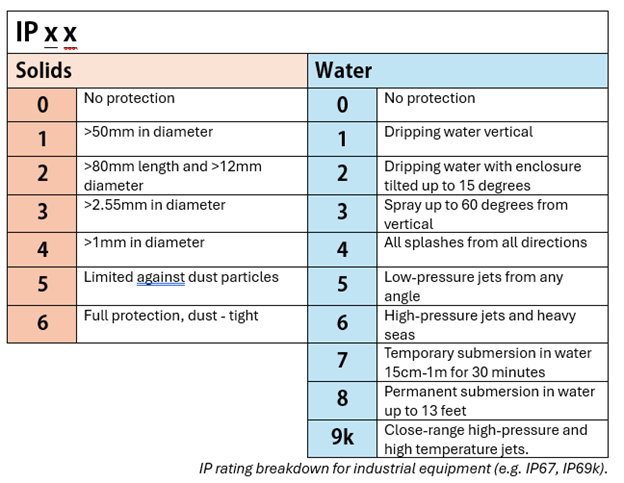
For dust, moisture, high humidity, splashes, submersion, or high-pressure sprays, match the device’s IP rating to your actual conditions.
Resistive vs. Capacitive Touchscreens in Industrial Use
Your choice of touchscreen can either be something you never think about, or a constant source of frustration.
Capacitive touchscreens (like those used in smartphones and tablets) detect touch through the body’s natural electrical charge. They offer better optical clarity, higher sensitivity, multi-touch gestures, and fast response to light touches.
However, these strengths can become limitations in industrial environments. Gloves, moisture, grease, dirt, and electrical noise can cause “ghost” touches or missed inputs, sometimes requiring cleaning or restarting the device.
Resistive touchscreens are often the better and more cost-effective option in these cases. They detect pressure rather than electrical charge, making them more reliable in harsh conditions and when operators are wearing gloves.
Favorite Devices and Brands
Some brands and models will fare better under rough treatment than others or are just easier to live with. Here are some of our go-to favorites, although not an exhaustive list, and our choice may differ depending on the application. If you’d like tailored guidance for your specific application, needs, and budget, reach out to our team and we’d be happy to help!
For process controls and instrumentation, we like Emerson Rosemount, Endress+Hauser, Siemens, and Vega. Specifically, we’ve had great success with Emerson’s Rosemount 5300 and 3408 series for level, and Micro Motion and Flexim Fluxus lines for flow.
Keyence and SICK deliver robust top performing photo eyes and laser sensors, including the Keyence LR-X series and SICK W16 series.
For barcodes and inspection cameras, Keyence, Cognex, and Datalogic all perform well depending on the application.
For industrial panel PCs and thin clients OnLogic, Hope Industrial, Dynics, and Parker are reliable and robust options. Arista excels in washdown and particulate-heavy environments, especially pharmaceuticals and biotech.
For PLCs, IO, drives, and panel components Allen-Bradley (Rockwell) and Siemens are trusted for high Mean Time Between Failure (MTBF) and Mean Time To Repair (MTTR) specs and broad support due to their popularity.
Red Lion by HMS is a favorite for networking, Ethernet switches, and meters thanks to solid reliability and easy configuration.
Read Part 2: Designing for User Experience and Lean Flow
Read Part 2 to learn more about lean process design and building a user interface that boosts productivity rather than frustration.
About the author
Elizabeth Engler is a Controls Integrator with diverse experience across controls design, programming, and software development. She enjoys logical challenges, user interface design, and programming machines to bring customer's visions to life. In her free time, Elizabeth enjoys gardening, mysteries, movies, and time with family.
Read My Hallam Story
About Hallam-ICS
Hallam-ICS is an engineering and automation company that designs MEP systems for facilities and plants, engineers control and automation solutions, and ensures safety and regulatory compliance through arc flash studies, commissioning, and validation. Our offices are located in Massachusetts, Connecticut, New York, Vermont, North Carolina and Texas and our projects take us world-wide.
Designing Industrial Applications for Wreck-It Ralph: Part 2
Designing Industrial Applications to keep Fix-It Felix Happy: Part 1
No Comments Yet
Let us know what you think